The Intelligence platform for the Built World
Permits,
Without the Wait.
QPoint, by AIAEC, analyzes your documents, identifies missing requirements, catches code mismatches, compares revisions, and gives your team cited answers before submission.
Qpoint edge frame — site plan scanned by AI
WHO IS IT FOR
Built For Everyone At The Table
From a solo architect to an entire planning department, public or private, QPoint fits how you work.
Private Sector
Public Sector
icon

Engineers

Review site rules and constraints before design begins.

icon

Design Firms

Review site requirements to guide better design choices.

icon

Contractors

Use site data to support smarter construction planning.

icon

Developers

Assess sites and support smarter development decisions.

icon

Operations

Coordinate workflows and improve daily agency operations.

icon

Plan Reviewers

Review plans faster with clear zoning and code insights.

icon

Building Officials

Oversee compliance and support informed building decisions.

icon

Code Enforcement

Identify violations and manage code compliance efficiently.

icon

Permit Examiners

Review permit applications with greater speed and accuracy.

KEY FEATURES
Built to Make Every Submission Review Ready
Everything you need to review faster, catch issues earlier, and keep every project aligned in one verified platform.
AI Chat & Parcel Intelligence
Any U.S. address, source-cited answers in under 30 seconds.
Zoning & Land Use
Permitted Uses
Parking Lots
Height & Density
Maps & Site Intelligence
Combine multiple parcels into one site, run buffer searches, and compare sites side by side.
Buffer Map
Overlays
Parcel Details
Allowed Uses
Site Comparison
Site Merge & Assembly
Site Constraints
Due diligence reports ready to share with every stakeholder.
Due Diligence Reports
Source Citations
Export to PDF
Submission-ready
Reports
Projects
Keep every site, report, and document for a deal in one workspace — with project memory, lessons learned, and role-based team access so nothing gets lost between deals.
Project Memory
Lessons Learned
Team Access & Roles
Teams & Organization
Bring your whole org into one workspace, with the right access for everyone.
Multiple Workspaces
Role-Based Access
Invite By Email
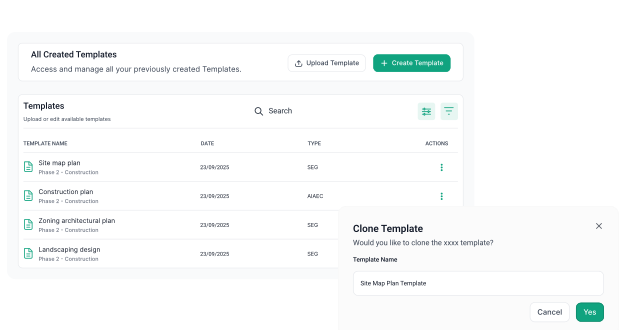
Permit Template Builder
Reusable, configurable templates for every permit.
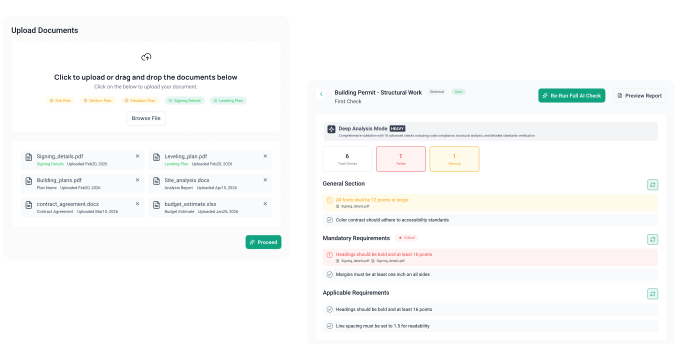
Full AI Check
Deep AI analysis across the entire submission.
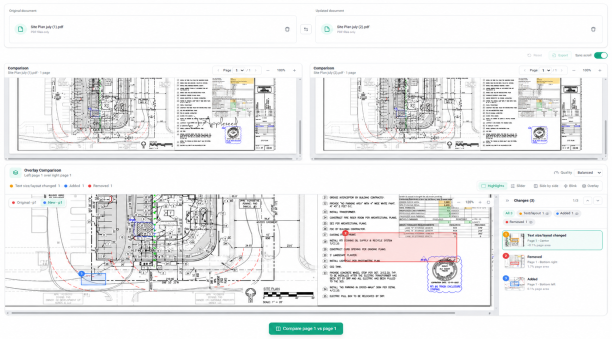
Document Comparison
Side-by-side difference that surfaces every change and classifies it as substantive or non-substantive.
Reporting
Submission-readiness and audit-ready dashboards.
Chatbot Assistant
Natural-language questions grounded in your project data, with cited answers.
Permit Template Builder
Reusable, configurable templates for every permit.
feature 7 image
Full AI Check
Deep AI analysis across the entire submission.
feature 8 image
Document Comparison
Organize, assign, and monitor tasks to keep projects on schedule and teams aligned.
feature 4 image
Projects
Plan, visualize, and update project timelines, milestones, and critical deadlines with ease.
feature 5 image
Teams & Organization
Use AI to answer project questions, automate routine work, and provide intelligent recommendations.
feature 6 image
Full AI Check
AI-powered permit intelligence platform that connects AEC applicants and Authorities Having Jurisdiction through a shared source of truth. Every AI finding maps to a specific checklist item, code section, and document authored by the AHJ, so applicants catch gaps before submission and reviewers get traceable, defensible results. 

With configurable permit templates, multi-mode AI checks, document comparison, and a grounded chatbot, Q-Point shortens review cycles and reduces rejections. The outcome: faster permits, fewer surprises, and clear accountability on both sides of the counter.
Deep AI analysis across the entire submission.
Document Comparison
AI-powered permit tracking and project management platform built for construction teams to keep every project and permit in one place. Each permit, task, and deadline lives in a single source of truth, so teams see status at a glance, catch delays early, and stay accountable across the pipeline.

With configurable workflows, task management, real-time tracking, and clear reporting dashboards, INOS shortens turnaround and stops things slipping through the cracks.

The outcome: on-time permits, tighter coordination, and full visibility from application to approval.
Side by side difference that surfaces every change and classifies it as substantive or non-substantive.
Reporting
AI-powered permit tracking and project management platform built for construction teams to keep every project and permit in one place. Each permit, task, and deadline lives in a single source of truth, so teams see status at a glance, catch delays early, and stay accountable across the pipeline.

With configurable workflows, task management, real-time tracking, and clear reporting dashboards, INOS shortens turnaround and stops things slipping through the cracks.

The outcome: on-time permits, tighter coordination, and full visibility from application to approval.
Submission-readiness and audit-ready dashboards.
Chatbot Assistant
AI-powered permit tracking and project management platform built for construction teams to keep every project and permit in one place. Each permit, task, and deadline lives in a single source of truth, so teams see status at a glance, catch delays early, and stay accountable across the pipeline.

With configurable workflows, task management, real-time tracking, and clear reporting dashboards, INOS shortens turnaround and stops things slipping through the cracks.

The outcome: on-time permits, tighter coordination, and full visibility from application to approval.
Natural-language questions grounded in your project data, with cited answers.
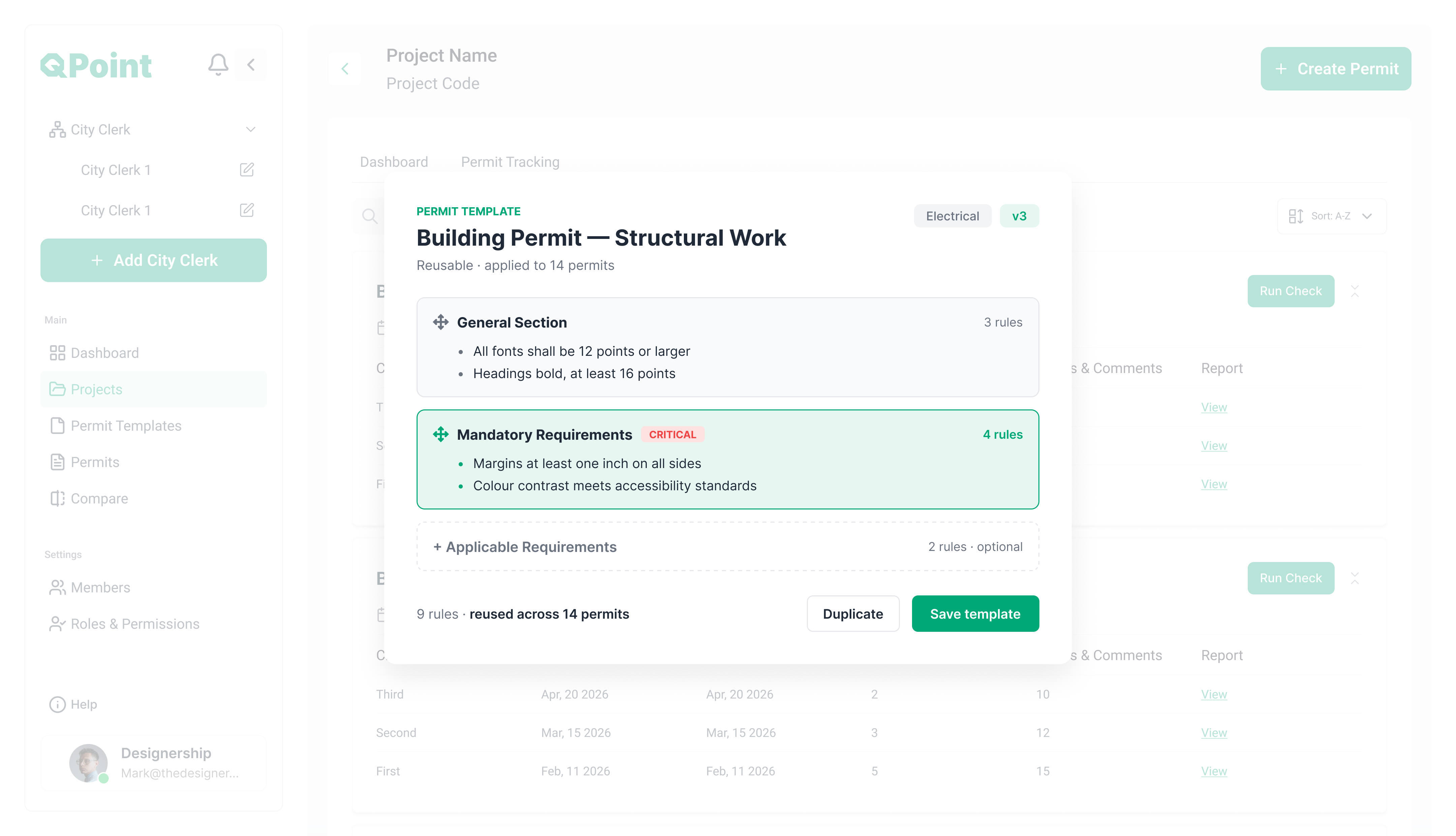
User interface of QPoint software showing a Building Permit template for Structural Work with general and mandatory requirements listed, including font size, margins, and color contrast, plus options to duplicate or save the template.
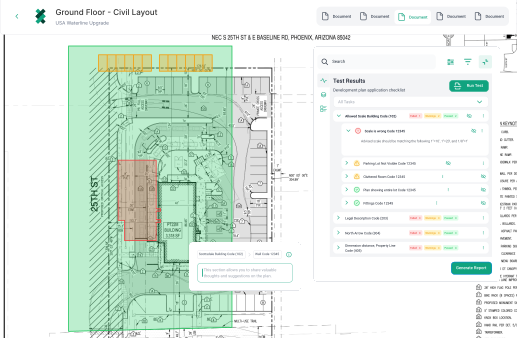
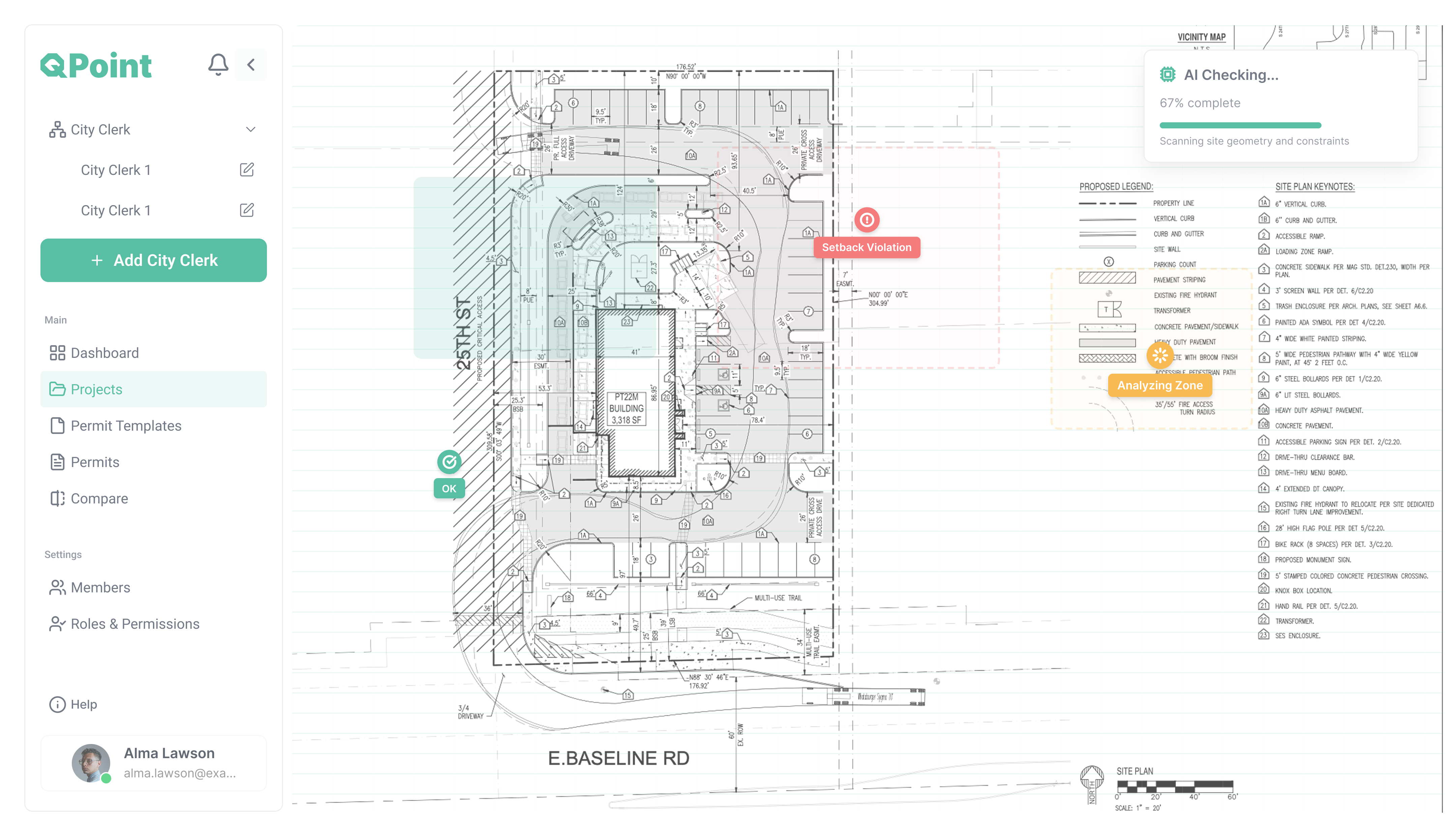
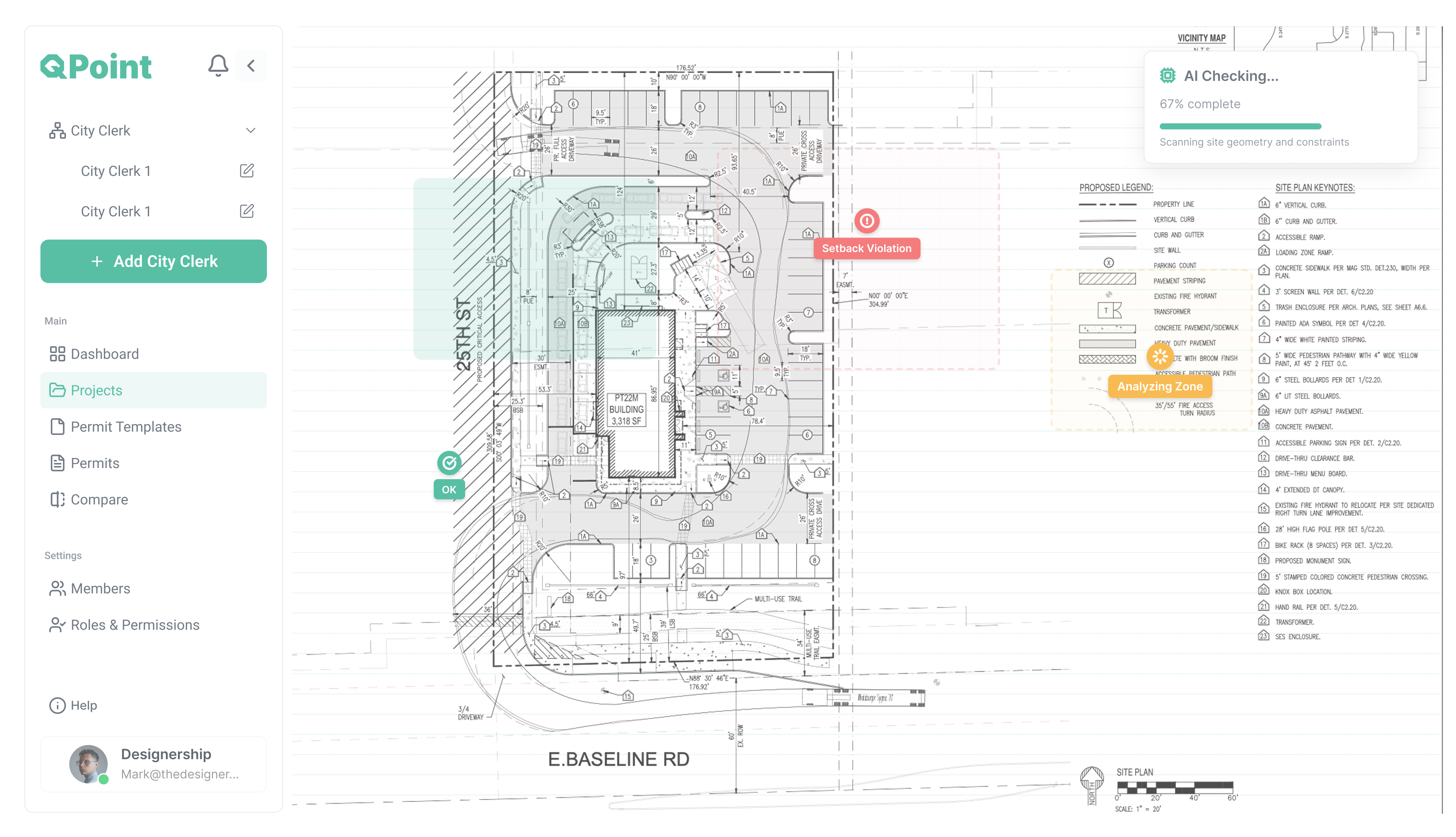
Screenshot of QPoint project management interface showing a site plan for a building at E. Baseline Rd, with areas marked OK and Setback Violation, and statuses like AI Checking and Analyzing Zone, alongside project navigation menu and user info.
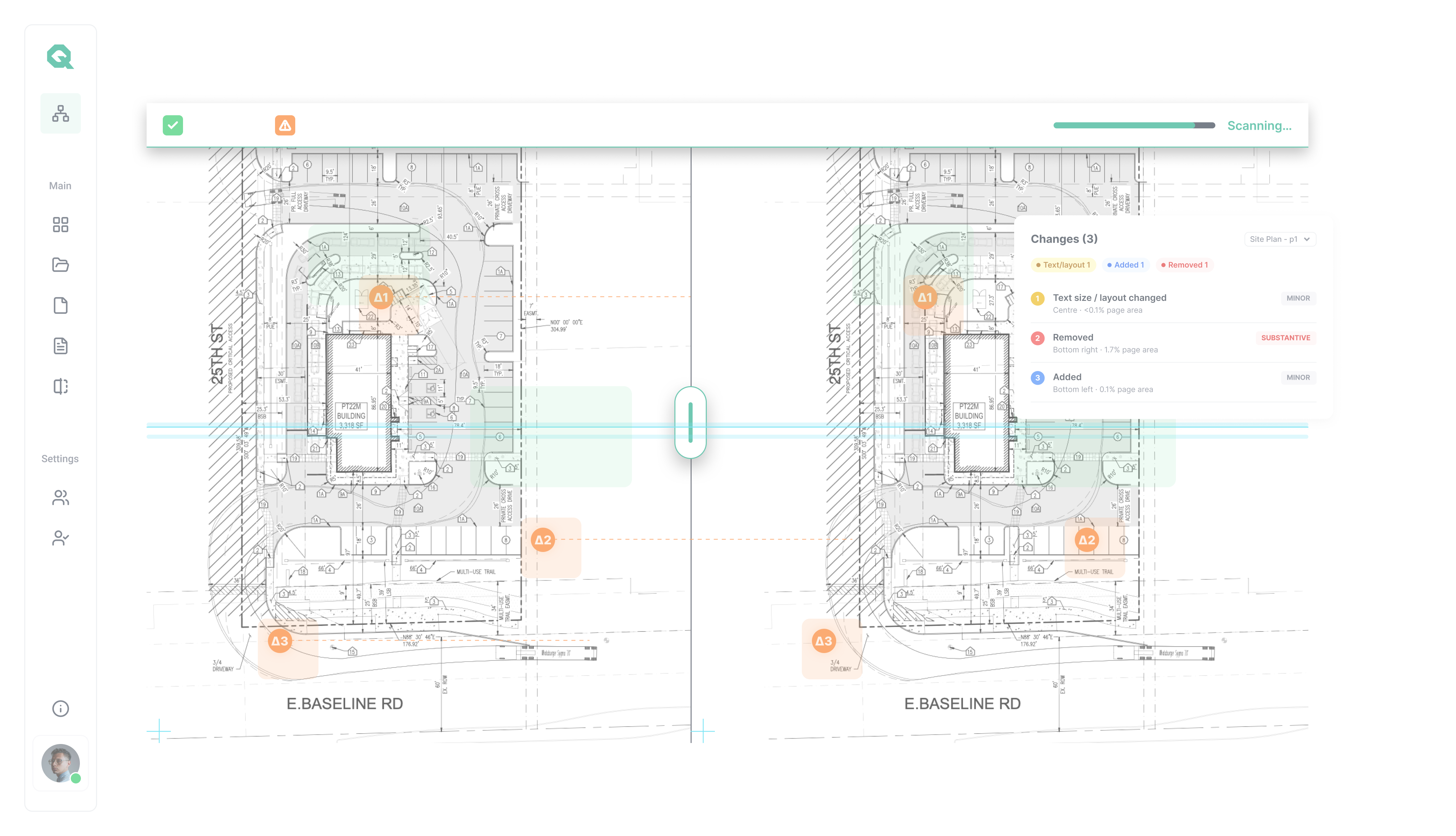
Screen showing a side-by-side comparison of two architectural site plans for a building labeled PT22M, with highlighted change markers A1, A2, and A3. A pop-up details three changes: text size/layout change, one removal, and one addition with locations and impact levels. The interface includes a vertical navigation menu on the left and a progress bar indicating scanning.
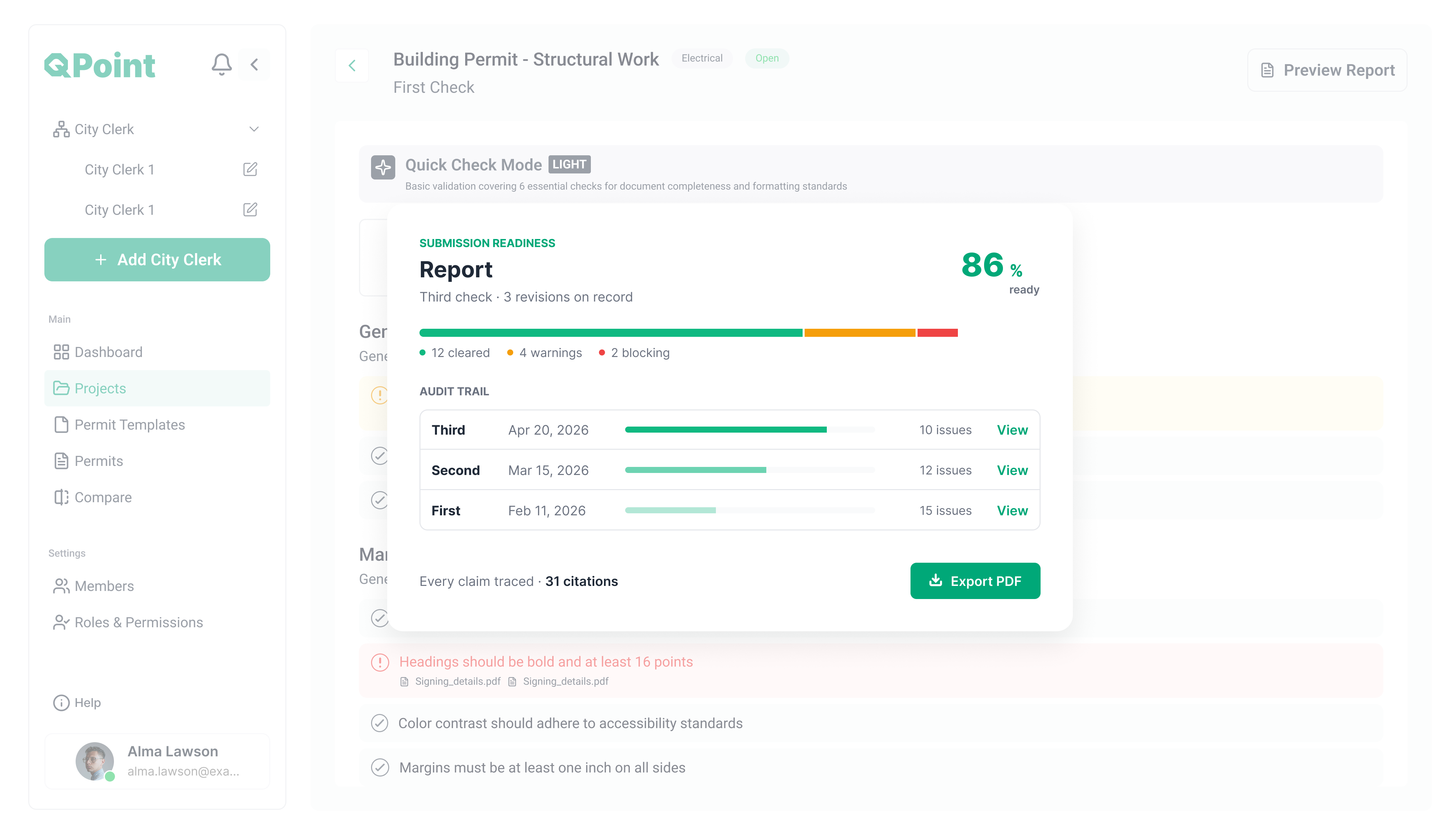
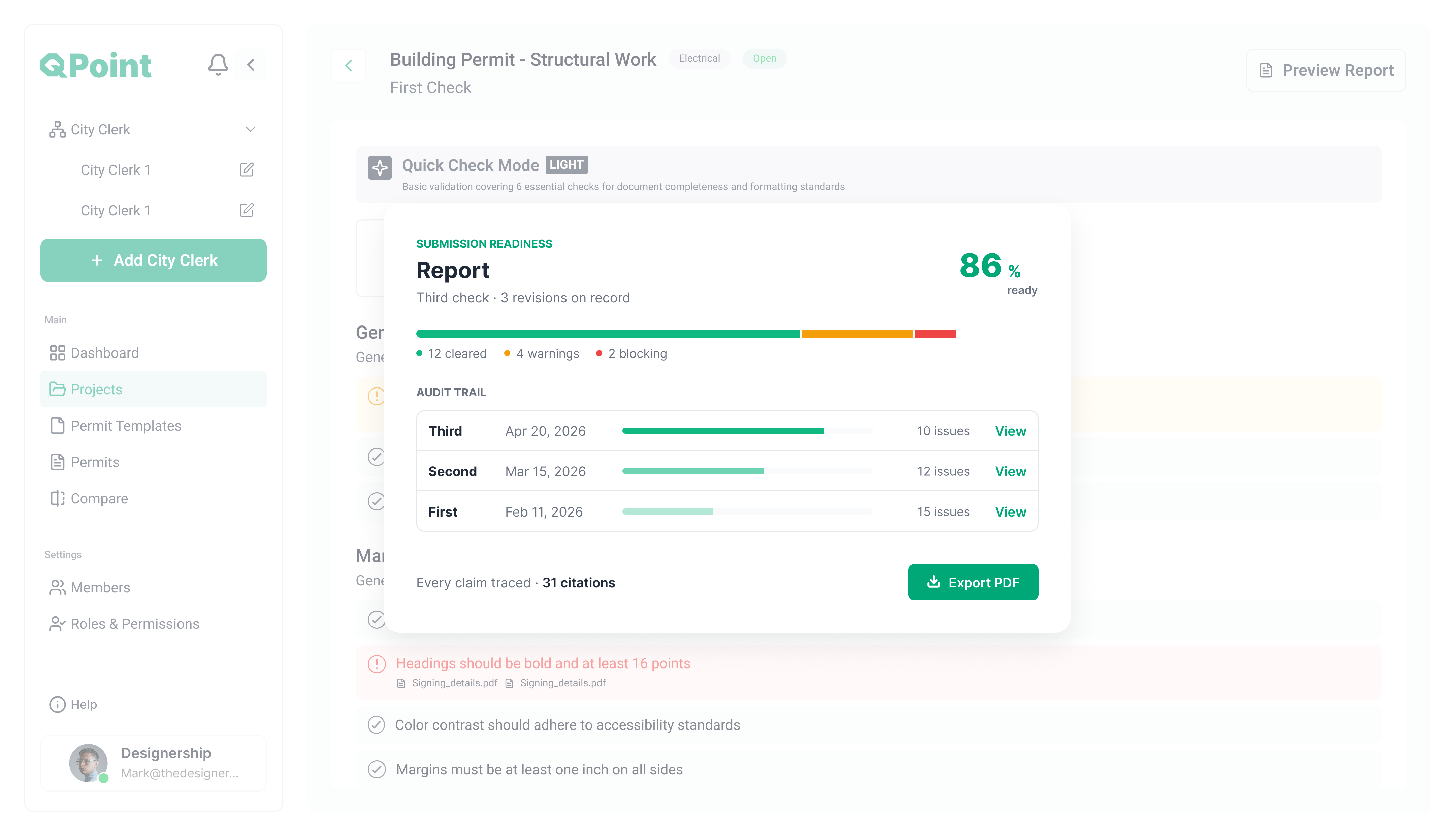
A software interface screen from QPoint showing a Building Permit structural work report. The report indicates submission readiness at 86% with 12 cleared, 4 warnings, and 2 blocking issues. The audit trail lists three checks: Third on Apr 20, 2026 with 10 issues, Second on Mar 15, 2026 with 12 issues, and First on Feb 11, 2026 with 15 issues. There is an option to export the report as a PDF. The sidebar includes navigation for City Clerk, Dashboard, Projects, Permit Templates, Permits, Compare, Members, Roles & Permissions, and a user profile.
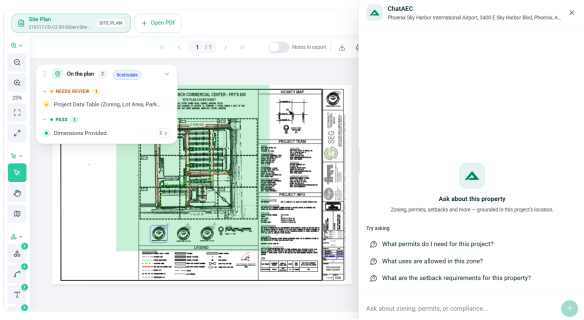
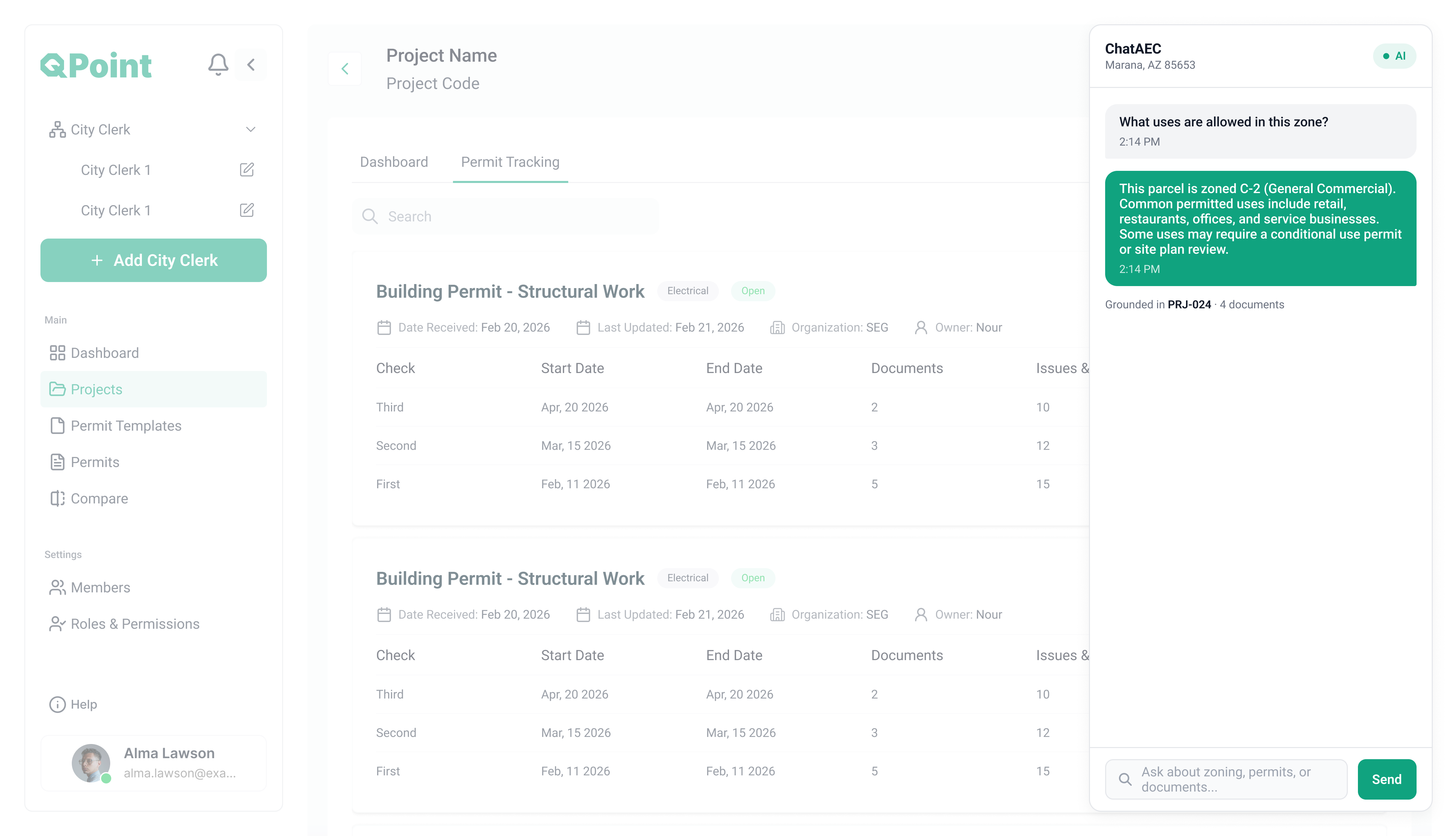
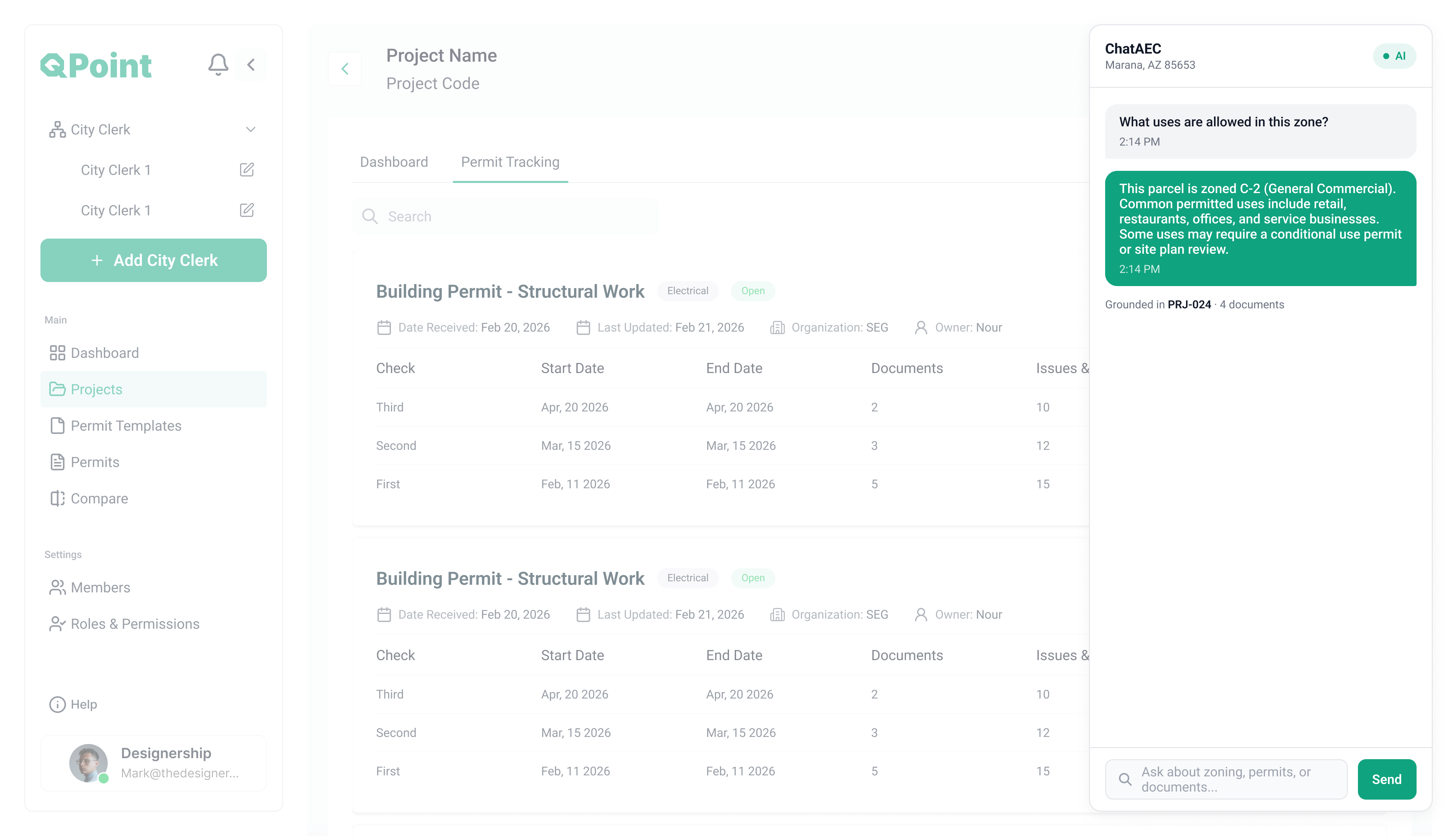
User interface of QPoint software showing a sidebar with city clerk options, main navigation including dashboard, projects, permit templates, and permits, and a chat window labeled ChatAEC answering a question about zoning in Marana, AZ. The main area displays permit tracking details for building permits labeled 'Structural Work' with dates, documents, issues, and statuses.
Full AI Check
AI-powered permit intelligence platform that connects AEC applicants and Authorities Having Jurisdiction through a shared source of truth. Every AI finding maps to a specific checklist item, code section, and document authored by the AHJ, so applicants catch gaps before submission and reviewers get traceable, defensible results. 

With configurable permit templates, multi-mode AI checks, document comparison, and a grounded chatbot, Q-Point shortens review cycles and reduces rejections. The outcome: faster permits, fewer surprises, and clear accountability on both sides of the counter.
Deep AI analysis across the entire submission.
Screenshot of QPoint software interface showing a site plan with labels like 'Setback Violation' and 'Analyzing Zone'. The site plan details a building labeled PT22M, parking, sidewalks, and roadways, with a legend and keynotes on the right. The left sidebar menu includes options like Dashboard, Projects (highlighted), Permit Templates, Permits, Compare, Settings, and Help. The site plan includes measurements and a scale with streets 25th St and E. Baseline Rd marked.
Document Comparison
AI-powered permit tracking and project management platform built for construction teams to keep every project and permit in one place. Each permit, task, and deadline lives in a single source of truth, so teams see status at a glance, catch delays early, and stay accountable across the pipeline.

With configurable workflows, task management, real-time tracking, and clear reporting dashboards, INOS shortens turnaround and stops things slipping through the cracks.

The outcome: on-time permits, tighter coordination, and full visibility from application to approval.
Side by side difference that surfaces every change and classifies it as substantive or non-substantive.
Screen showing a side-by-side comparison of two architectural site plans for a building labeled PT22M, with highlighted change markers A1, A2, and A3. A pop-up details three changes: text size/layout change, one removal, and one addition with locations and impact levels. The interface includes a vertical navigation menu on the left and a progress bar indicating scanning.
Reporting
AI-powered permit tracking and project management platform built for construction teams to keep every project and permit in one place. Each permit, task, and deadline lives in a single source of truth, so teams see status at a glance, catch delays early, and stay accountable across the pipeline.

With configurable workflows, task management, real-time tracking, and clear reporting dashboards, INOS shortens turnaround and stops things slipping through the cracks.

The outcome: on-time permits, tighter coordination, and full visibility from application to approval.
Submission-readiness and audit-ready dashboards.
QPoint user interface showing a Building Permit - Structural Work report in Quick Check Mode with 86% readiness, including audit trail entries for three checks with issues counts and a button to export PDF.
Chatbot Assistant
AI-powered permit tracking and project management platform built for construction teams to keep every project and permit in one place. Each permit, task, and deadline lives in a single source of truth, so teams see status at a glance, catch delays early, and stay accountable across the pipeline.

With configurable workflows, task management, real-time tracking, and clear reporting dashboards, INOS shortens turnaround and stops things slipping through the cracks.

The outcome: on-time permits, tighter coordination, and full visibility from application to approval.
Natural-language questions grounded in your project data, with cited answers.
User interface of QPoint project management software showing dashboard with permit tracking details for 'Building Permit - Structural Work,' including start/end dates, documents, and issues; a chat window on the right displays a conversation about zoning, stating the parcel is zoned C-2 for general commercial use with typical allowed uses like retail, restaurants, offices, and service businesses, and notes some uses may require permits or site plan review.
WORKFLOW
From Upload to Approval in Three Steps
A straight path through review, no juggling tools, no version confusion.
1

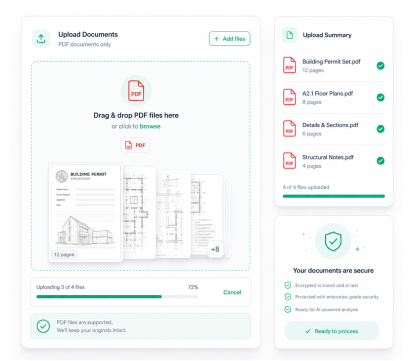
Upload PDF Permits

Drop in drawing sets and documents, multi-page PDFs.
2

AI Scans & Flags Issues

QPoint checks against jurisdiction code and surfaces problems by issues found.
3

Review, Annotate & Approve

Your team marks up, resolves comments, and signs off, all in real time.
feature 2 imagefeature 3 imagefeature 1 image
Step 1

Upload PDF Permits

Drop in drawing sets and documents, multi-page PDFs.
Step 2

AI Scans & Flags Issues

It checks against jurisdiction code & surfaces problems by issues found.
Step 3

Review, Annotate & Approve

Your team marks up, resolves comments, and signs off, in real time.
BENEFITS
Why Choose QPoint
Fewer Rejections. Faster Approvals. Lower Cost.
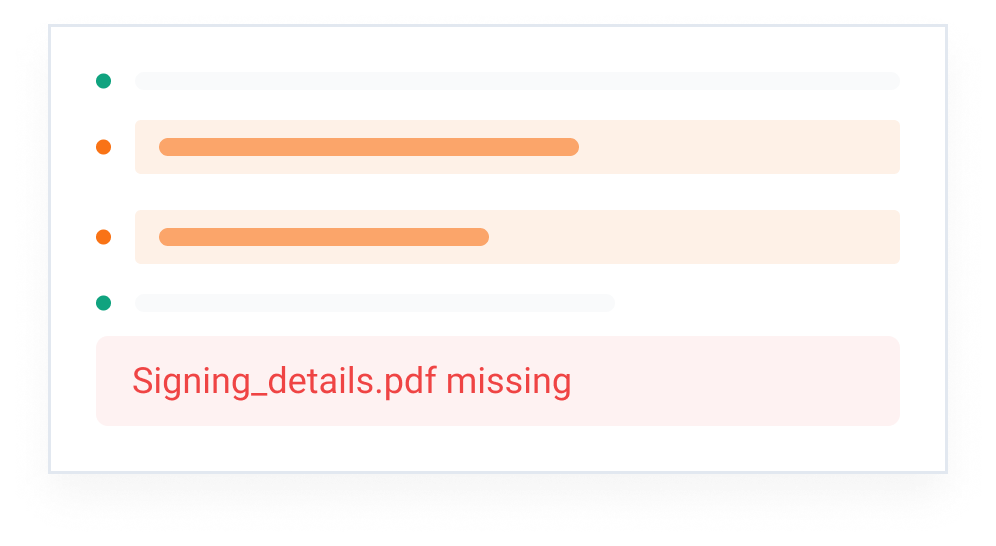
Catch Gaps Before Submission
QPoint finds missing files and conflicts before the review begins.
A chat-style interface showing several dots and partially obscured text lines in orange and teal, with a highlighted error message in red reading 'Signing_details.pdf missing.'
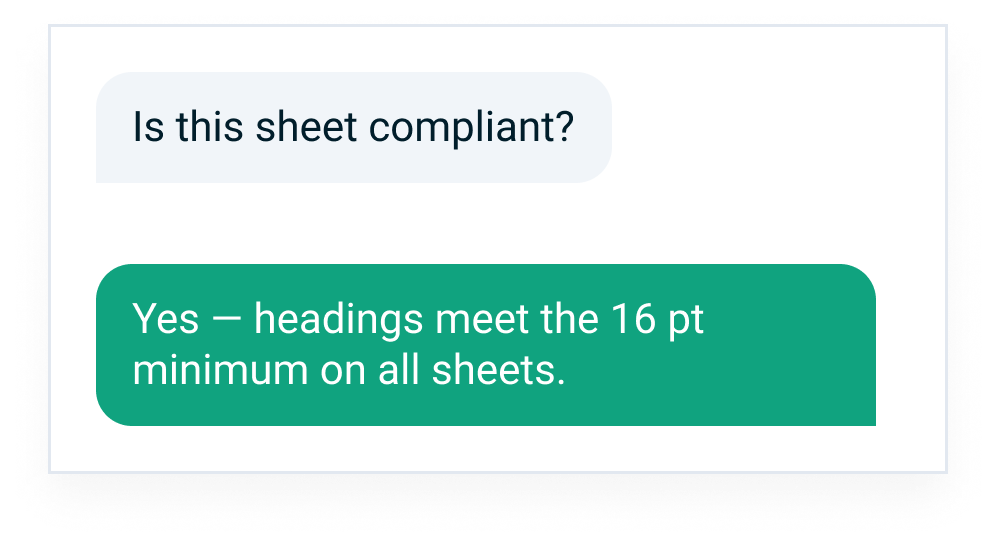
AI You Can Actually Trust
Every AI answer is grounded in your documents and cites its source. Catch every setback before it forces a redesign.
Chat message asking if a sheet is compliant followed by a reply confirming the headings meet the 16 point minimum on all sheets.
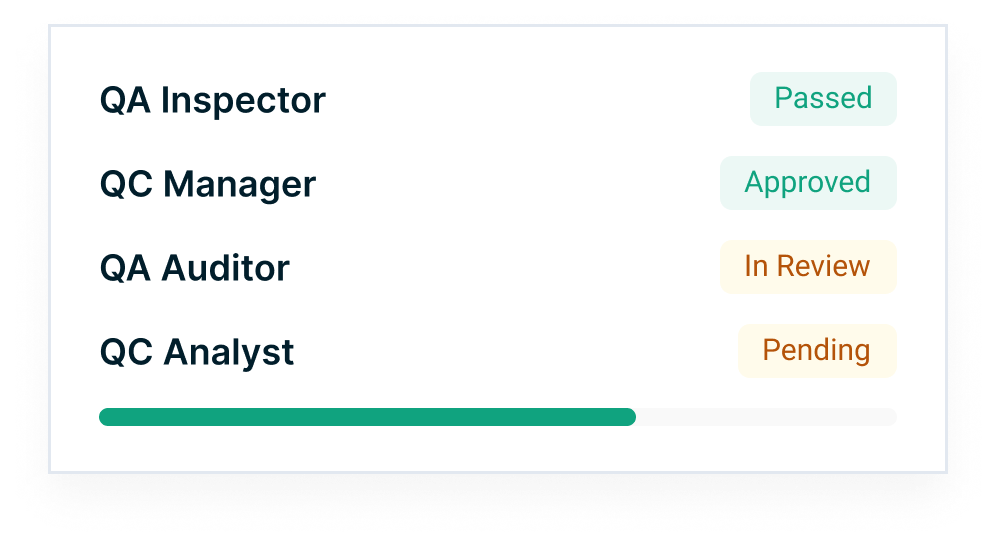
One Platform. Faster Results.
One platform lets every role review, compare, and take action fast.
Status list showing QA Inspector marked as Passed, QC Manager as Approved, QA Auditor as In Review, and QC Analyst as Pending, with a progress bar mostly filled in green below.
FAQs
Frequently Asked Questions
Everything teams ask before rolling QPoint into their review process.
What exactly is QPoint?
icon
QPoint is AIAEC's AI powered plan review tool; it analyzes submissions, catches code mismatches, and gives cited answers before submission.
Which permit types and jurisdictions does it support?
icon
QPoint supports 173 plus jurisdictions today, with more added regularly.
How does the AI actually check my documents?
icon
QPoint checks every submission against jurisdiction code, citing the specific code section behind each finding.
How long does a review take?
icon
The average AI review time is 3 minutes.
Does it integrate with the tools we already use?
icon
Yes, QPoint connects with Dropbox, SharePoint, and Adobe Acrobat.
Is my project data secure?
icon
Yes, QPoint is built for regulated, high stakes review work by AIAEC.
CONTACT US
Get In Touch
Questions about a jurisdiction, a demo, or a technical issue? Send us a note and we'll get back fast.
Let's talk about your project
Whether you’re exploring QPoint, requesting a demo, planning a pilot, or looking for an enterprise solution, our team is ready to help you reduce permit rejections, accelerate approvals, and build a more efficient, AI-verified submission workflow.
Office
5240 N 16th Street, Suite 105, Phoenix, Arizona 85016
United States
Sales
sales@aiaec.com
Response Time
Under 24 hours
Thank you!
We received you request, our team will get back to you soon!
Oops! Something went wrong while submitting the form.
Ready to modernize your permit review process?
See how QPoint cuts rejections and review time for AEC teams and city clerks alike.
Start For Free

Ready to Modernize your Permit Review Process?

See how QPoint cuts rejections and review time for AEC teams and city clerks alike.
Scroll to Top